Clinically Reviewed By Brijith Maria Anto
Subject Specialist – Speech-Language Pathology
Quick Summary
- Early intervention works best as a partnership. The professional assesses your child, sets goals and guides the plan. Parents support it at home. You do not need to become a therapist.
- The most useful home support is often simple: responsive play, predictable routines, visual cues, and short, regular practice built into everyday moments.
- Digital activities can complement the plan when a professional recommends them. They are one part of a wider programme, never a replacement for play, face-to-face interaction or therapy, and they still count towards your child’s overall screen time. Being professionally assigned does not exempt them from age-related screen guidance.
- If something worries you, act early. Talk to your child’s doctor or a qualified professional rather than waiting to see what happens.
Therapy sessions are short. Home is everything else.
A child in early intervention may spend an hour or two a week with a therapist or special educator. The rest of the week (breakfast, bath time, the walk to the shop, the ten minutes before bed) belongs to you. Many parents feel that gap sharply: I want to help, but am I doing the right thing? What should I even practise?
Here is the reassuring part. Supporting early intervention at home is less about adding extra work and more about using the moments you already share, with a little intention. This guide walks through how, step by step, and where structured digital activities such as those on VergeTAB can fit in when your child’s professional recommends them.
What Early Intervention Means for Families
Early intervention means identifying developmental concerns in the early years and giving children and families the right support as soon as possible. Depending on the child, that may include therapy, special education, guidance for parents, or a mix of these.
Two reference points are useful for families. In India, the government’s Rashtriya Bal Swasthya Karyakram (RBSK) screens children from birth to 18 years for defects at birth, diseases, deficiencies and developmental delays, and District Early Intervention Centres (DEICs) at district hospital level provide referral support, mainly for children up to six years of age. Internationally, the CDC’s Learn the Signs. Act Early. programme offers free milestone checklists for ages 2 months to 5 years, designed to encourage families to act on concerns rather than adopt a “wait and see” approach. The CDC is also clear that these checklists are conversation tools for families and professionals, not diagnostic standards.
Within that picture, the roles at home are straightforward. As our Early Intervention page puts it, the professional leads and caregivers support. The professional identifies needs, sets goals and selects activities. Parents support the child during those activities, follow the guidance they are given, and share what they notice.
Why Home Practice Matters
The WHO’s Nurturing Care Framework describes what young children need to thrive: good health, adequate nutrition, safety and security, responsive caregiving, and opportunities for early learning. Families are the main providers of that care. Two of those five needs, responsive caregiving and early learning, happen largely through everyday interaction.
Home is also where new skills get used for real: asking for water, putting shoes on when asked, waiting for a turn. Practising in familiar places with familiar people is how a skill met in a session becomes a skill your child owns.
8 Practical Ways to Support Early Intervention at Home
1. Get clear with your child’s professional first
Generic advice is a poor substitute for your child’s own plan. At your next session, ask:
- What are my child’s top two or three goals right now?
- Which activities should we practise at home, and how often?
- How should I prompt, and how should I respond when my child finds something hard?
- Is there anything I should avoid or stop doing?
- What should I note down and bring to the next session?
Write the answers down. They become your home guide.
2. Build practice into daily routines
You rarely need a special “therapy time”. Routines you already have are full of small opportunities.
| Routine | Simple ways to practise | Skill area |
|---|---|---|
| Waking and dressing | Offer two choices (“blue socks or red?”). Give one-step, then two-step instructions (“get your socks, then sit”). | Communication, following instructions |
| Mealtime | Pause before serving more and wait for a look, sound, gesture or word. Name the foods together. | Requesting, vocabulary |
| Play | Matching, sorting, stacking and turn-taking games. | Cognition, attention |
| Bath time | Name body parts. Talk through the order: wash, rinse, dry. | Language, sequencing |
| Outings | Point out and name what you see. Let your child lead what to look at. | Vocabulary, shared attention |
| Bedtime | The same picture book, in the same order, with the same words. | Routine, language, calm |
These are examples only. Your professional will tailor them to your child’s age and goals.
3. Follow your child’s lead and play face to face
Responsive caregiving means noticing your child’s signals and answering them promptly and warmly. In practice:
- Get down to your child’s eye level.
- Copy their sounds and actions, then add one small step. If they say “ball”, you say “red ball”.
- Wait. Count to five before helping, so your child has time to try.
- Follow their interest instead of redirecting it.
For young children, play is not a break from learning. It is how learning happens.
4. Use visuals and predictable routines
Many children understand pictures more easily than spoken instructions. Simple picture cards, a “first this, then that” board, and the same order each day can reduce stress and help children know what comes next. Give a short warning before a transition, such as “two more minutes, then bath”. Our blog on why some children understand better visually explains why this works for so many families.
5. Keep practice short, regular and joyful
Short, predictable sessions that end on a success, are easier for young children to sustain than long ones that end in frustration. Praise effort (“good trying!”) more than correctness and stop before your child is tired. Ask your professional what length suits your child’s age and attention. For more on keeping home practice calm and consistent, read How Parents Can Maximize Therapy at Home.
6. Notice and record small wins
Progress in the early years is usually gradual, and it is easy to miss when you live it daily. A simple log makes it visible. Pick the one goal your professional has asked you to watch, then note the date, the situation, what your child did, and how much help they needed.
A practical example. Imagine the professional’s goal is “asks for a preferred item using a word or sign”. A parent logs one short entry every week or two, always in the same everyday situation, such as snack time:
| Date | Situation | What my child did | Help needed |
|---|---|---|---|
| 3 Nov | Snack time | Pointed at the biscuit tin and cried | Full prompt: I said “biscuit?” and waited, then handed it over |
| 17 Nov | Snack time | Reached and said “bi” | Partial prompt: I held up two choices |
| 1 Dec | Snack time | Said “biscuit” after I paused | Gesture only: I raised my eyebrows and waited |
This is an illustration only. Your professional will tell you which goal to track and how to prompt.
Remember: Progress Can Be Gradual
Progress may appear as fewer prompts, clearer communication or greater willingness to participate. Discuss observations with your child’s professional to understand what they mean.
No single day in that log looks dramatic. Read together, though, the pattern is clear: same goal, same situation, and less help needed each time. That is exactly the kind of change that is easy to forget and valuable to show at the next session. Note the rough days too (“tired, no attempts”), because context helps your professional as much as wins do.
A few tips for keeping the log going:
- Keep each entry to one or two lines.
- Use simple labels for support: full prompt, partial prompt, gesture only, independent.
- If your child uses digital activities, note which activity, for how long and how they engaged. The XL parent portal is designed to keep families informed about activity and progress, so you can compare it with your own notes. See How VergeTAB Works for how to log in.
Every few months, ask yourself what your child can do now that they could not do six months ago, and share your notes with your professional so they can adjust the plan. For a look at how therapists track milestones more formally, see Tracking Developmental Milestones in Therapy, and our blog on how to know if your child is making progress in therapy shows what small progress can look like.
7. Use digital activities thoughtfully, and only as part of the plan
Screens in the early years deserve a careful approach. The American Academy of Pediatrics (AAP) stresses that babies learn best from real-world interaction. Its 2016 guidance, still widely quoted, advised avoiding screen media other than video-chatting under 18 months, high-quality content watched together at 18 to 24 months, and about an hour a day of high-quality programming for ages 2 to 5. Its newer digital ecosystems policy moves beyond simple time limits and asks families to look at content quality, context and conversation: watch and play together, protect sleep, movement, play and time with caregivers, and keep screen-free zones and times such as mealtimes and the hour before bed. The AAP’s free Family Media Use Plan can help you map out your family’s routine.
Professionally assigned does not mean exempt
The AAP’s family guidance covers screen use in general. It does not specifically address children with developmental needs, and it does not treat professionally chosen activities as exempt. A digital activity selected by a professional is still screen time. It still counts towards your child’s day, and it still has to be weighed against sleep, play, movement and conversation. So before introducing any digital activity, ask your child’s professional or pediatrician:
- Is a digital activity suitable for my child’s age at all? For babies and very young toddlers, face-to-face play and responsive caregiving will usually remain the main focus.
- How long should each session be, how often, and at what time of day?
- Should I sit and use it together with my child? For young children, the answer is usually yes.
- How does this fit with the rest of my child’s screen time?
A Note About Screen Time
Professionally assigned digital activities still count towards a child’s total screen time. Consider age, duration, supervision, sleep, physical activity and face-to-face interaction when planning digital use.
When a professional does recommend structured digital practice, the difference between an open tablet and a purpose-built device matters. Open devices put games, videos and notifications one tap away from the activity you meant your child to do. VergeTAB, powered by XceptionalLEARNING, takes a different approach. It is a locked digital learning device that works exclusively with the XceptionalLEARNING (XL) Platform. The device does not come with preloaded activities. The platform provides them, and the professional selects them. Depending on what is available and on your child’s goals, these may include:
- Communication and language: picture recognition, vocabulary and language-based instructions
- Cognition and early learning: matching, sorting, recognition and problem-solving
- Attention and visual recognition: attending to a task and to visual cues, and identifying pictures or objects
- Following instructions and sequencing: visual instructions, ordered steps and completing structured tasks
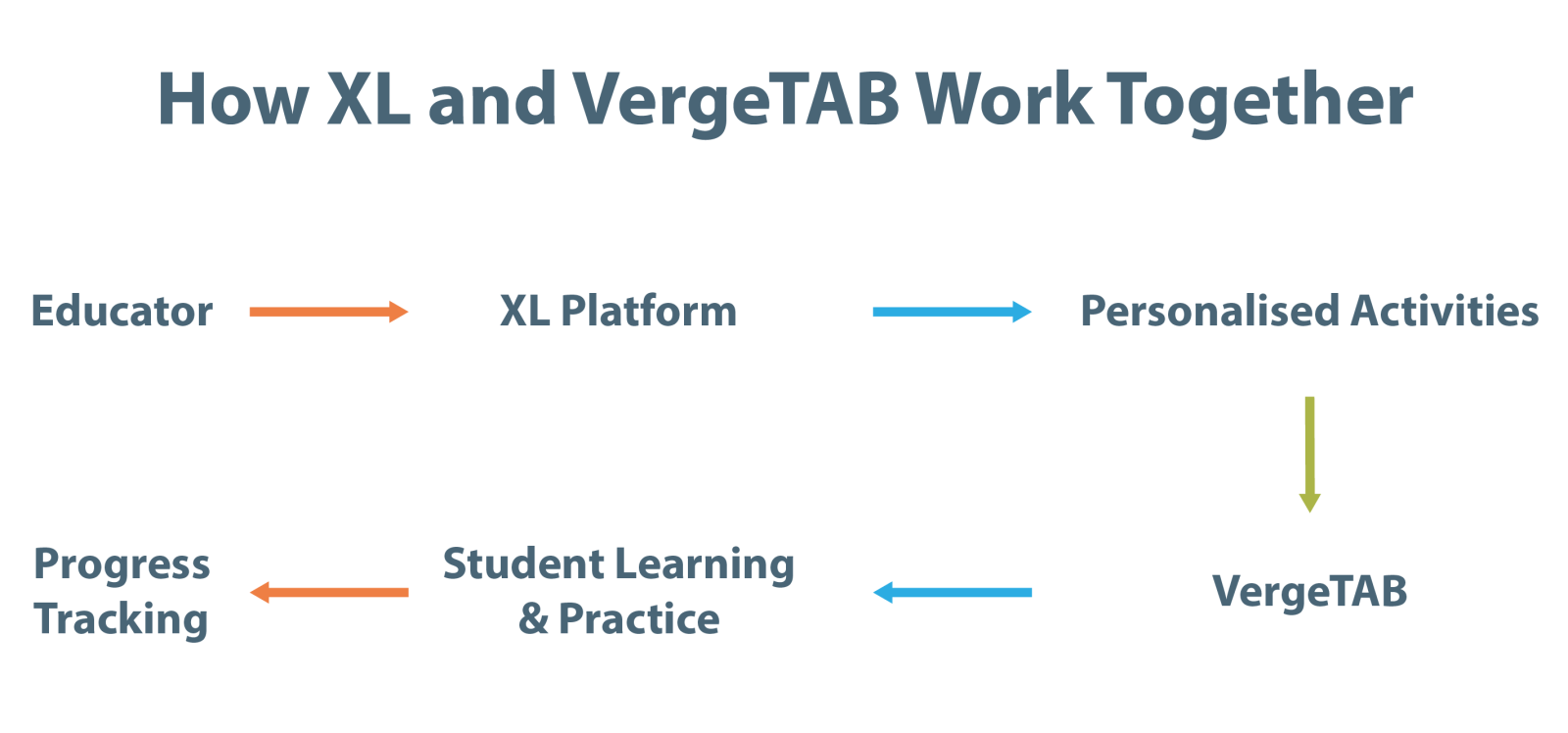
Here is how it fits together at home:
- Your child’s professional assesses their needs, sets goals, selects suitable activities, and advises whether, when and for how long digital practice suits your child’s age.
- The activities are assigned through the XL Platform.
- Your child opens them on VergeTAB for the agreed length of time, with you alongside when this is recommended.
- You share what you notice, and the professional reviews the plan and adjusts it if needed.
For a step-by-step view of logging in, the dashboard and the parent portal, see How VergeTAB Works. To see the device and platform for yourself, you can book a free demo.
It is worth being clear about what VergeTAB is not. It does not assess development, diagnose a condition, choose goals or replace professional care, and it should sit alongside play, conversation and everyday routines. A locked, distraction-free device changes what is on the screen, not the fact that it is a screen, so session length, supervision and age-suitability should still follow your professional’s advice and the guidance above. Our Early Intervention page explains this in more detail, and our blog on screen time and children with special needs covers structured versus passive screen use.
8. Look after yourself and your family
Parents who are tired, anxious or stretched thin, find it harder to stay playful and patient, and that is entirely human. Share the plan with your partner, grandparents and other regular caregivers so everyone uses the same words and routines. If the load feels heavy, ask your professional about parent support groups or counselling. Our Role of Parents page explores how parents act as advocates, caregivers, educators and decision-makers, and why their own well-being is part of the picture.
Common Mistakes to Avoid
- Turning practice into a test. If your child is resisting, stop and try again later. Home practice should feel like connection, not assessment.
- Comparing your child with others. Every child’s pace is different. Compare your child with where they were a few months ago.
- Doing everything at once. Focus on the one or two goals your professional has set.
- Replacing professional advice with internet advice. That includes this article. Use it to prepare better questions, not to skip the conversation.
- Assuming therapy screen time does not count. Digital activities assigned by a professional still add to your child’s total screen time. Keep them planned, supervised and time-limited, and never let them crowd out play, sleep or family time.
When to Talk to a Professional
Parents often notice things first. CDC milestone checklists list skills that most children (75% or more) are expected to reach by a given age. If your child is not reaching them, seems to be losing skills they once had, or you simply feel something is not right, speak to your child’s doctor and ask about developmental screening or an evaluation. You do not need to wait for a teacher or relative to confirm what you have seen. Research reviewed in a peer-reviewed paper on the CDC campaign points the same way: children whose parents shared developmental concerns with a provider were more likely to be enrolled in early intervention.
In India, your pediatrician or a local government hospital can tell you about the DEIC in your district. If you are concerned about a specific area, our blogs on speech delay in children and toe walking in toddlers explain what parents should know and when to seek help.
Frequently Asked Questions
References
- Centers for Disease Control and Prevention. Learn the Signs. Act Early. and Key Points about CDC’s Developmental Milestone Checklists.
- World Health Organization, UNICEF and World Bank Group. Nurturing Care Framework for Early Childhood Development.
- American Academy of Pediatrics. Helping Kids Thrive in a Digital World: AAP Policy Explained (HealthyChildren.org, June 2026), summarising the policy statement Digital Ecosystems, Children, and Adolescents (Pediatrics, 2026).
- American Academy of Pediatrics. Media and Young Minds (2016).
- American Academy of Pediatrics. Family Media Use Plan.
- Ministry of Health & Family Welfare, Government of India. Setting Up District Early Intervention Centres: Operational Guidelines, RBSK (2014).
- Vikaspedia. Rashtriya Bal Swasthya Karyakram (RBSK).
- Peer-reviewed paper on CDC’s Learn the Signs. Act Early. campaign, PMC4633015.
This article is for general information and is not a substitute for assessment, diagnosis or advice from a qualified professional. VergeTAB is a digital activity tool intended to complement, not replace, professional care.
See VergeTAB in Action
Discover how VergeTAB, powered by the XceptionalLEARNING Platform, provides access to structured digital activities selected by your child’s professional.